PREQUIREMENTS: AppVersion 24.23.3.7 or higher
In businness central you have to setup which documenst are eligible for pick-up digital signment.
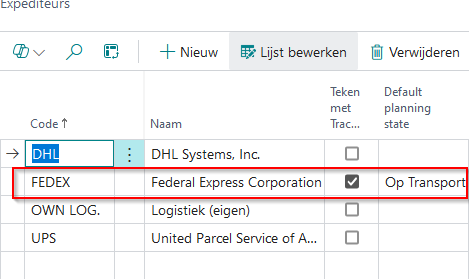
There are two options where you can set this up. On shipping agent and on shipment method.
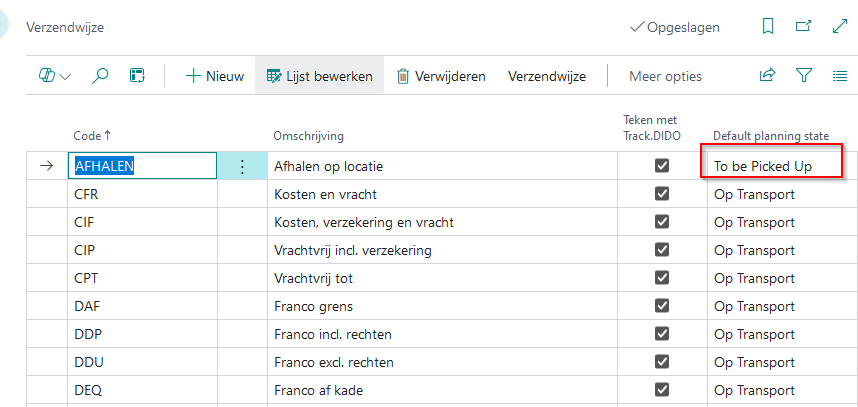
You have to set the default planning state to "To be Pickup Up" (ofcourse Sign with trackDIDO has also to been set)
Shipment method
Shipping Agents
If the default planning state on a order results in 2 different states (because the default planning state of the shipping agent is different then the default planning state of the shipment method), then is the shipment method default planning state leading.
After you have setup this fields, you are ready to go. When you post a document which is eligible for pick-up signment, its getting visible in the pick-up dashboard https://spotyourdata.nl/pickup (it can take about 15 seconds after posting)
Was dit artikel nuttig?
Dat is fantastisch!
Hartelijk dank voor uw beoordeling
Sorry dat we u niet konden helpen
Hartelijk dank voor uw beoordeling
Feedback verzonden
We stellen uw moeite op prijs en zullen proberen het artikel te verbeteren